US Passport Photo Requirements 2026 (Complete Guide)
By Elena Dev, Founder · May 3, 2026 · 8 min read
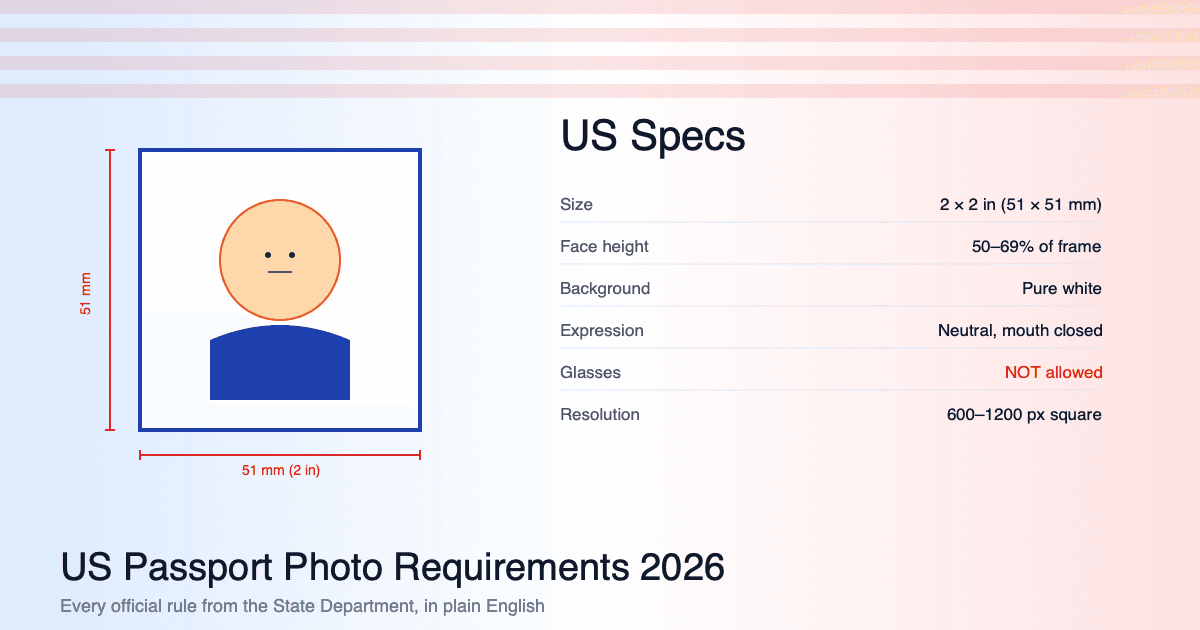
The US State Department's photo requirements are the most thoroughly documented in the world - and also the most strictly enforced. A photo that's even slightly off will delay your application by 2-3 weeks. This guide goes through every official requirement for 2026, in detail, with what each one actually means in practice.
All requirements below are sourced from the US Department of State's photo requirements as of 2026.
Watch: US passport and DS-160 visa photo requirements explained (2 min)
At-a-glance specifications
| Specification | Requirement |
|---|---|
| Size | 2 × 2 inches (51 × 51 mm) |
| Resolution (digital) | 600 × 600 to 1200 × 1200 pixels |
| Color | Color photo, not black and white |
| Head size | 1 to 1⅜ inches (25-35 mm) from chin to top of head |
| Background | Plain white or off-white |
| Expression | Natural, neutral, mouth closed |
| Glasses | Not allowed (since November 2016) |
| Head covering | Not allowed except religious or medical |
| Recency | Within 6 months of application |
| Quality | Sharp, no shadows, no glare |
Size requirements explained
2 × 2 inches. This is exactly 51 × 51 millimeters at 300 DPI. The photo must be square - not rectangular, not landscape. A photo that's slightly off-square (50 × 51 mm, for example) will be rejected by automated systems.
If you're submitting digitally:
- Minimum: 600 × 600 pixels
- Maximum: 1200 × 1200 pixels
- File size: between 54 KB and 10 MB
- File format: JPEG only
Head size requirements
The single most common rejection reason for US applications is incorrect head size.
Required: the height from the bottom of the chin to the top of the head must be 1 to 1⅜ inches (25-35 mm). In percentages of the frame, that's 50-69% of the photo height.
Common mistakes:
- Photo zoomed too far in: head fills the entire frame (rejection)
- Photo zoomed too far out: head occupies less than 50% (rejection)
- Forehead cropped: top of head not visible (rejection)
- Chin cropped: bottom of chin not visible (rejection)
The State Department's automated system measures head height in pixels and compares to expected ranges. A few millimeters off is enough for rejection.
How to get this right: use a tool that auto-detects your face and applies the correct US-specific crop. IDPhotoSnap does this automatically. Manual cropping is possible but unforgiving - even a 5% error in the crop will fail.
Background requirements
Plain white or off-white.
Specific clarifications from the State Department:
- No patterns, textures, or designs
- No shadows on the background
- No other people, pets, or objects visible
- No "scenery" - no walls with art, no curtains, no doors with knobs visible
The most common background failure is a shadow on the wall behind you, caused by standing too close to it. The fix is to stand 2-3 feet away from any wall and use even lighting. Full diagnostic in Why Was My Passport Photo Rejected.
Expression and pose
Required:
- Natural, neutral expression
- Mouth closed
- Eyes open, looking directly at the camera
- Both ears visible (or at least clearly the same)
- Head straight, not tilted left or right
- Shoulders facing the camera, not turned
Smiling is rejected. This trips many people. The State Department specifically rejects:
- A wide smile showing teeth (always)
- A closed-mouth smile that lifts the cheeks (usually)
- A "natural smile" - there's no such category in US rules
If you genuinely cannot keep a neutral expression (some people can't), take 20 photos and pick the one where your default smile is least pronounced.
Glasses (banned since 2016)
Glasses are not allowed in US passport photos as of November 2016. Even glasses without glare, even thin frames, even prescription glasses you wear daily - they must be removed for the photo.
The only exception: a documented medical condition that prevents glasses removal. You must submit a signed letter from your doctor with the application.
Photo paper requirements (printed photos)
If you're submitting a printed photo with a Form DS-11 (in-person renewal), it must be:
- Printed on photo paper (glossy or matte) - never plain printer paper
- Single photo, with no borders
- Cut to exactly 2 × 2 inches
- Not folded, not creased, not damaged
A photo printed on regular paper, even high-quality paper, will be rejected. The texture matters for biometric scanning. Full guide to printing at home or a lab for under $1.
How to make a US passport photo at home
The process that works:
- Set up: plain white wall, stand 2-3 feet away, large window in front of you, good daylight
- Camera: at eye level, 6 feet away (use a tripod or have someone hold it)
- Pose: neutral expression, mouth closed, glasses off, looking straight ahead
- Take 10 photos - variation gives you options
- Pick one with eyes open, mouth closed, even lighting
- Crop to US specs: the US passport photo tool auto-detects your face and applies the exact 2×2 inch / 50-69% face-height crop the State Department requires. For visa applications (B1/B2 tourist, F-1 student, H-1B work) use the US visa photo tool with the same spec.
- Verify dimensions: the file should be exactly 51 × 51 mm at 300 DPI (or 600 × 600 to 1200 × 1200 pixels for digital submission)
- Save as JPEG, sRGB color profile, between 54 KB and 10 MB
For phone-specific instructions, see How to take a passport photo with iPhone.
FAQ
Can I use a passport photo from another country's application?
Only if the dimensions match exactly. UK photos (35×45mm) cannot be used for US (51×51mm) - the aspect ratios are different.
What if I'm renewing and look similar to my old photo?
Even close to identical, you need a new photo within 6 months. The State Department rejects "passport renewal" submissions that reuse old photos.
Are infant passport photos different?
Yes - infants and young children have separate, more lenient rules. The full face must be visible, eyes open if possible (a sleeping infant photo is sometimes accepted), and no other people in the frame.
Can I edit lighting in Photoshop?
Minor exposure correction is fine. Skin smoothing, removing blemishes, eye-color changes, or anything that alters your appearance is not allowed and will result in rejection plus a possible fraud flag.
The US State Department publishes the most detailed photo specs in the world. The trade-off: they're strictly enforced, with no human leniency for "close enough." Use IDPhotoSnap to handle US-specific dimensions and face-coverage rules automatically - free, no signup, runs in your browser.
Related guides
USCIS Pivot May 2026: I-485 to Consular DS-260 + Visa Photo
USCIS shifted I-485 Green Card filers to consular DS-260 in May 2026. Who is affected, what the policy says, and the 2x2 inch visa photo spec.
DV-2027 Lottery: Passport Required at Registration (2026)
From 10 April 2026, DV-2027 Diversity Visa entrants must upload a passport scan with DS-5501. Photo spec (600x600 px JPEG) unchanged.
Are AI Passport Photos Banned in 2026? (Fact-Check)
Content farms claim a new AI passport photo ban in 2026. Fact-check: no new rule. What State Dept actually prohibits and allows.
iPhone Passport Photo 2026 (5-Minute Setup, Won't Get Rejected)
Take a consulate-compliant passport photo with your iPhone in 5 minutes. Lighting setup, camera settings, head positioning, and the 4 mistakes that cause 80% of rejections.
Why Was My Passport Photo Rejected? Top 10 Reasons (2026)
Most passport photo rejections come down to 10 specific issues. Each one is fixable in 2 minutes. Here's the full diagnostic checklist with examples.
Passport Photo Size Guide: mm, Inches, Pixels (Countries)
US: 2×2 inch (51×51mm), UK: 35×45mm, Canada: 50×70mm, China: 33×48mm. Complete size reference with pixel dimensions at 300 DPI for printing.
Best Free Passport Photo Apps 2026 (Honest Comparison)
We compared major free and paid passport photo tools for 2026. Real prices, privacy practices, country coverage, and the catch with each.
Can You Smile in a Passport Photo?
The short answer is: it depends on the country. Here is a detailed breakdown of which countries allow smiling and which require a neutral expression.
How to Print a Passport Photo at Home (Under $1 at Lab)
Download a print-ready PDF with 6 photos per A4. Step-by-step guide for home printing and photo labs. Save $10 - 20 vs pharmacy kiosks.
About the Author
Elena Dev, Founder of IDPhotoSnap
Elena Dev is the sole operator of IDPhotoSnap. Her work involves auditing the official photo specifications of 100+ countries against issuing-authority sources (embassies, government portals, ICAO 9303) and translating those rules into a browser-only tool that runs entirely on the user's device. The full 276-format specification dataset is published as MIT open data on GitHub. Source verification methodology and corrections policy are documented on the editorial standards page. Every article is written and reviewed by Elena Dev. Corrections: elena@idphotosnap.com.
Found this useful? Public reviews are how new readers discover IDPhotoSnap. Leave a quick Trustpilot review →