Best Free Passport Photo Apps 2026 (Honest Comparison)
By Elena Dev, Founder · May 5, 2026 · 9 min read
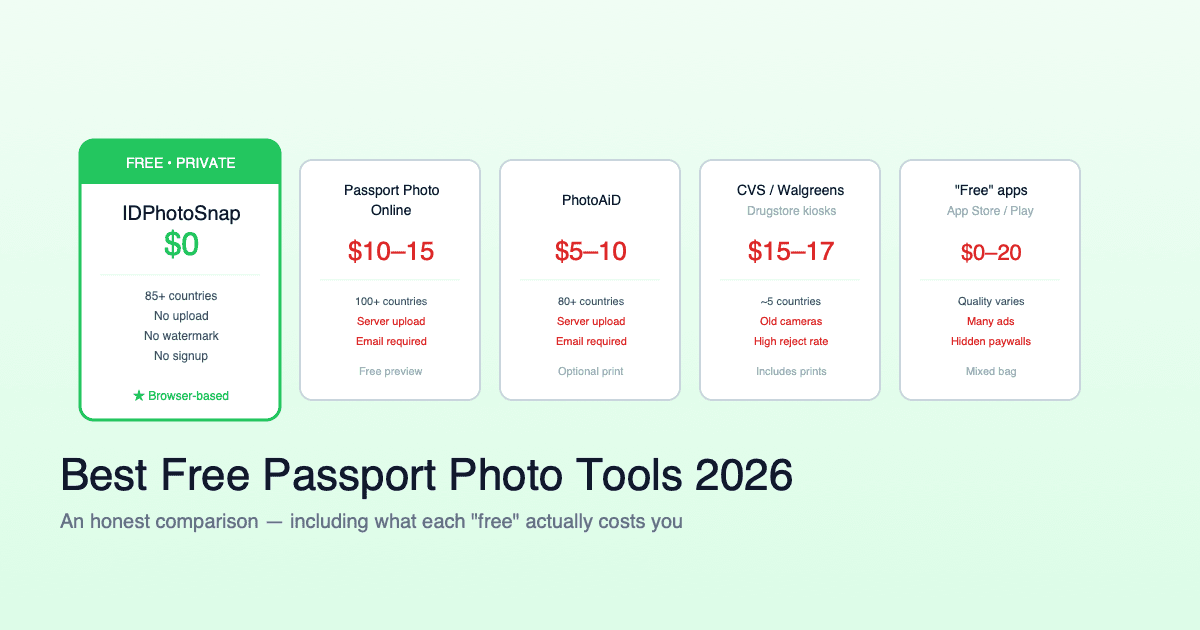
The phrase "free passport photo app" hides a lot of variation. Some are genuinely free with zero strings. Some are free to use but charge to download. Some are free but ad-supported. Some are free but upload your photo to a third-party server. Here's an honest comparison of the major options for 2026, with links to each service so you can verify the claims yourself.
Disclosure:I built one of the tools listed below (IDPhotoSnap). I've tried to be objective about strengths and weaknesses across all options. If you spot anything wrong with how a competitor is described, please leave a comment and I'll correct it.
What "free" should actually mean
Before the comparison, here's the standard I'm using:
- Truly free: you can use the tool, get a print-ready file, and apply for your passport without paying anything
- Free to use, paid to download: you can preview the result but the final file requires payment ($5-15 typical)
- Free with ads: the tool is free but the experience is interrupted by ads or upsells
- Free but you pay with data: the photo is uploaded to a server and used for the company's ML training
A passport photo tool that uses any of the last three has a hidden cost. They're listed below with that cost made explicit.
IDPhotoSnap - truly free, browser-based
- Cost: free
- Privacy: photo never leaves your device (image processing runs entirely in your browser)
- Countries supported: 100+ countries / 276 document formats, validated against 15+ official government sources
- Watermark: none
- Account required: no
- Catch: no print delivery - you get a digital file you have to print yourself ($0.30 at any pharmacy)
Built specifically to remove the artificial paywalls common in this category. Image processing uses the browser's canvas API and on-device face detection, so there's no server cost to run, which is why it can stay free without ads or subscriptions.
You can verify the privacy claim directly: open your browser's DevTools, go to the Network tab, and watch what gets sent during use. There's no image upload because all processing happens in the browser.
Best for: anyone with a phone or laptop who can print at a pharmacy or has a home photo printer. Try it →
Passport Photo Online - passportphoto.online
- Cost: "free" to preview, $10-15 to download the print-ready file
- Privacy: photos uploaded to their server
- Countries supported: 100+
- Watermark: on free preview, removed when you pay
- Account required: no, but you must enter email to download
- Catch: the price comes only at the final download step
Probably the largest competitor by traffic. The product itself works well, but the "free" label is misleading - there's no way to actually get a usable photo without paying. They also have an aggressive upsell flow ("AI background change for $5", "express delivery for $8") that adds to the base price.
If you're going to pay $10-15 for the convenience of skipping print yourself, this is one of the cleanest paid options. Best for: people who don't mind paying $10-15 for convenience and don't want to deal with cropping themselves.
PhotoAiD - photoaid.com
- Cost: $5-10 per photo
- Privacy: photos uploaded to their servers
- Countries supported: 80+
- Watermark: on the preview, removed after purchase
- Account required: email required for purchase
- Catch: not free at all, despite the brand positioning
PhotoAiD is straightforward: it's a paid service. They occasionally offer "first photo free" promotions but the regular price is $5-10. Quality of output is generally high, with reliable AI background removal. They also offer print delivery (mailed to your address) for an additional fee.
Best for: people who already have an account, want a polished result with minimal effort, or specifically want a printed photo mailed to them.
Drugstore kiosks (CVS, Walgreens, Walmart)
CVS passport photos · Walgreens passport photos
- Cost: $15-17 for two prints
- Privacy: their kiosk camera takes the photo, stored on their system briefly
- Countries supported: mostly US-format only
- Account required: no
- Catch: if the photo is rejected, you pay again to redo it
Worth mentioning because it's the default many people fall into. Quality is genuinely mediocre - the kiosk cameras are old, lighting in the store is harsh fluorescent, and the operators are not trained photographers. Rejection rates from drugstore kiosks are high enough that the State Department flags them in its guidance.
Best for: people who specifically want printed photos handed to them in 5 minutes and are willing to pay for that convenience. The quality-to-cost ratio is the worst of any option, but the speed is unmatched.
Free apps in app stores (iOS/Android)
There are 50+ "passport photo" apps in the App Store and Google Play. Quality varies enormously:
- Scams: free to use, then charge $20 in-app to "unlock HD" - which means watermark removal
- Legitimate free apps with ads: acceptable but the ad experience is distracting
- Companion apps to paid services: the app is free but the actual photo download costs money
I'm not naming specific apps because ownership and quality change frequently in this category. If you want to use a phone app specifically, check recent reviews carefully - apps that were good in 2023 may not be in 2026.
Other browser-only tools (the crowded category)
Since 2024-2025, several other passport photo tools have adopted the same browser-only architecture as IDPhotoSnap. They use the same underlying tech (WebAssembly + MediaPipe Face Detection or equivalent + browser-side background segmentation). What differs is country coverage, source citation, and which document types are supported. Honest summary for travelers comparing:
- Passport Photo Snap (passportphotosnap.com) - claims 140+ country presets. Browser-only architecture. Free at export. Differs from IDPhotoSnap mainly in count claim (140 vs our 100 verified - many of the 140 are ICAO default fallback rather than independently validated specs).
- PassLens (passlens.com) - newer entrant (2026 launch). Browser-first, no signup, free. Country coverage and document types currently narrower than the established tools.
- PassportPhotoWiz (passportphotowiz.com) - browser processing, country templates, free export. Established. Country count not prominently disclosed.
- PassportGrid Free (passportgridfree.com) - explicit WebAssembly architecture. Same privacy positioning. Free.
- PhotoGov (photogov.net) - claims 200 countries / 900 document types. Some processing happens server-side based on their docs. Not strictly browser-only despite marketing language.
How to evaluate them when picking: (1) open DevTools Network tab during the export workflow on each tool to verify which actually keep the photo local (claim vs reality often differ), (2) check whether the country list is independently validated or padded with ICAO defaults, (3) look at the FAQ section on the country page for the destination you actually need - tools that cite the issuing authority (HMPO for UK, Bundesdruckerei for Germany, MFA for China, etc) are more likely to have accurate specs than tools that copy each other's country lists.
Browser-only is now table stakes, not a differentiator. The differentiators in this category in 2026 are: verified country coverage (does each country have a real spec, not a fallback), document type depth (passport vs visa vs ID card vs driving license vs residence permit per country), and government source citation (which authority published the spec). IDPhotoSnap is built around those three: 100+ countries with 276 document formats, citing 15+ government sources.
How each one handles country specifications
| Tool | Countries | Auto-applies specs | Known weak countries |
|---|---|---|---|
| IDPhotoSnap | 103 (276 doc formats, 15+ gov sources cited) | Yes | Some smaller African nations |
| Passport Photo Online | 100+ | Yes | Generally accurate |
| PhotoAiD | 80+ | Yes | Generally accurate |
| Drugstore kiosks | ~5 | Manual selection only | Mainly US-only |
If you're applying for a major country (US, UK, Canada, EU, India, China, Japan, Australia), any tool above handles it correctly. The differences appear for less common destinations.
How each one handles privacy
This is the dimension that gets the least attention but matters most for some users. A passport photo is biometric data - losing control of where it goes is a real privacy cost.
| Tool | Photo upload | Photo retention | Used for ML training |
|---|---|---|---|
| IDPhotoSnap | Never (browser-only) | None | No |
| Passport Photo Online | Yes | Up to 30 days | Likely |
| PhotoAiD | Yes | Up to 90 days | Likely |
| Drugstore kiosks | Local system | Variable | Unlikely |
| Free apps | Varies | Varies | Often unclear |
If privacy matters, the only option without server upload is a browser-based tool that processes the image client-side. IDPhotoSnap is built that way (you can verify by watching DevTools Network tab during use).
What I'd actually pick
If I were a user with no preference for any specific tool:
- For the US, UK, Canada, EU, or any major country: any browser-only tool with verified specs for that country works. IDPhotoSnap if I want depth (100+ countries with 276 document types, 15+ government sources cited). Passport Photo Online if I'd rather pay $10-15 for the convenience of skipping the print step.
- For a visa application (Schengen, US, UK, China, India): the document-format match matters more than country count. Check whether the tool has the exact spec - Chinese visa is 33x48mm not 35x45mm, US visa is square 51x51mm with 240KB DS-160 cap, Indian Sarathi needs 20-50KB JPG. Tools that gloss over these are likely to produce a photo that fails at upload validation.
- For a less common country: verify by opening the country page on the tool and checking whether the spec cites a government source (HMPO, Bundesdruckerei, MFA, etc) or just shows generic ICAO defaults.
- For maximum privacy: use any tool that runs in the browser without uploading. Verify with DevTools Network tab. See our privacy-first explainer for the 90-second test.
- Avoid drugstore kiosks unless it's the only option you have access to - quality is too inconsistent for the price.
- Avoid app store apps with "free" in the name unless you've verified they're not paywalled at the download step. See why free apps add watermarks for the freemium pattern.
FAQ
Why are paid tools so common if free ones exist?
Free ones either have a hidden cost (privacy, ads) or use a different cost model entirely (client-side processing has no server cost). Most companies that build these tools are venture-backed and need revenue, so they default to a "free preview, paid download" model.
Is it safe to upload my passport photo to a third-party site?
Technically risky - you're trusting their security and their data retention policies. Most established services have reasonable security, but a passport photo is biometric data that's harder to "rotate" than a password. Browser-based tools that don't upload at all sidestep the question.
Can I just use my phone's photo and crop it manually?
You can, but most countries have specific rules about face-coverage percentage that are very hard to estimate by eye. Even a small deviation from the spec gets your photo rejected.
What if my country isn't supported by any tool?
Check the consulate website for your destination country's specifications, and use a generic image-cropping tool to match those dimensions exactly.
The "best" passport photo app depends on how you weigh privacy, cost, and convenience. There's no single answer, but at least the tradeoffs are now explicit. If you want to try the tool I built, IDPhotoSnap is at idphotosnap.com - free, no signup, runs in your browser, no upload.
Related guides
Why Was My Passport Photo Rejected? Top 10 Reasons (2026)
Most passport photo rejections come down to 10 specific issues. Each one is fixable in 2 minutes. Here's the full diagnostic checklist with examples.
iPhone Passport Photo 2026 (5-Minute Setup, Won't Get Rejected)
Take a consulate-compliant passport photo with your iPhone in 5 minutes. Lighting setup, camera settings, head positioning, and the 4 mistakes that cause 80% of rejections.
US Passport Photo Requirements 2026 (Complete Guide)
Every official US passport photo requirement for 2026: size, background, head size, expression, and State Department specifications.
How to Take a Passport Photo at Home (Step-by-Step Guide)
Save $15 - 20 by taking your own passport photo at home. Here is exactly how to do it right - background, lighting, pose, and common mistakes to avoid.
Compare Passport Photo Tools 2026: 5 Claims to Verify
Passport photo tool marketing is full of unverifiable claims. How to read the five most common ones and verify each in 5 minutes.
We're Live on Product Hunt Today
After several months of building, IDPhotoSnap is officially on Product Hunt. Here's why we built it, what it does, and what's next on the roadmap.
About the Author
Elena Dev, Founder of IDPhotoSnap
Elena Dev is the sole operator of IDPhotoSnap. Her work involves auditing the official photo specifications of 100+ countries against issuing-authority sources (embassies, government portals, ICAO 9303) and translating those rules into a browser-only tool that runs entirely on the user's device. The full 276-format specification dataset is published as MIT open data on GitHub. Source verification methodology and corrections policy are documented on the editorial standards page. Every article is written and reviewed by Elena Dev. Corrections: elena@idphotosnap.com.
Found this useful? Public reviews are how new readers discover IDPhotoSnap. Leave a quick Trustpilot review →