Why Free Passport Photo Apps Add Watermarks (2026 Test)
By Elena Dev, Founder · May 13, 2026 · 9 min read
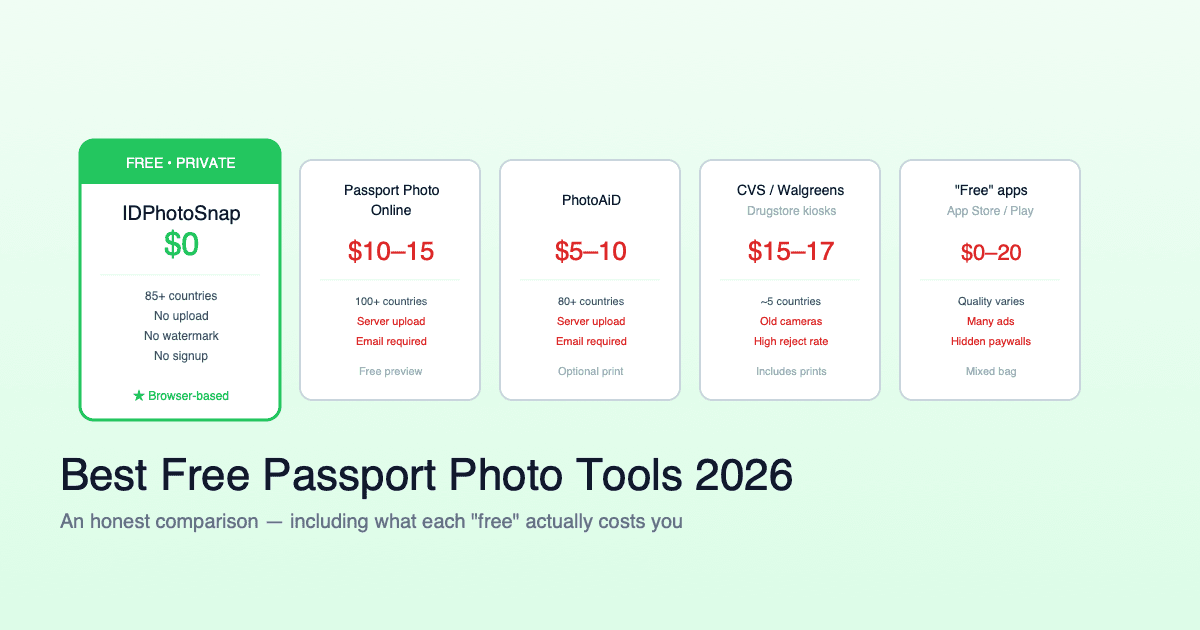
You downloaded a free passport photo app. You took the photo, cropped it, hit export. The result has the app's logo or a "Made with X" banner across the bottom. Now you have to decide: pay the $5-15 unlock fee, try a different app and hope for the same outcome, or find another way entirely. This is the freemium watermark trap, and it has a specific anatomy worth understanding before you spend any more time on it.
The short version
- Watermarked passport photos are rejected by every major embassy and visa portal.
- The watermark is a freemium pressure tactic - you pay $5-15 to remove it.
- You cannot edit the watermark out without violating AI retouching rules at consulates.
- Genuinely free unwatermarked tools exist but are rare. They subsidize via ads, donations, or related products.
- 3-minute test before commit: generate a placeholder photo, check the export at 100% zoom, see what it actually delivers.
- Government portals run automated biometric validation that flags watermarks as background-pattern noise.
Why every free app seems to do this
The economics of a passport photo app are unforgiving. Each export needs:
- A face detection model (TF Lite, MediaPipe, or commercial SDK license)
- A background segmentation model (RMBG, DeepLab, or commercial)
- Per-country spec data, validated against government sources
- Print layout templates (multiple photos per A4 / Letter)
- App store fees (Apple 30% / Google 15-30%) on every purchase
- Cloud rendering for any server-side processing
A truly free product covers these costs another way: ads, paid country expansions, founder subsidy, or a bundled service. Apps without any of these revenue paths use the watermark trap: the free tier "works" (the app does not lie about being free), but the output is functionally unusable. The user has invested 5-10 minutes and is at the export step. The friction to start over is high. The conversion rate to in-app purchase is exceptional.
This is not unique to passport photo apps. The same pattern appears in PDF compressor apps, video downloader apps, and watermark-removal apps (yes, that is a recursive irony). Recognize the pattern, save your time.
Why an embassy will not accept a watermarked photo
Government photo submission portals run automated biometric checks before the photo reaches a human reviewer. The checks include:
- Background uniformity check. The portal samples pixels in 4-8 corner zones of the image. A pure white background has values around R[245-255] G[245-255] B[245-255]. A watermark in any corner pulls those values out of range and the photo is flagged.
- Foreground / background segmentation. The portal runs its own background segmentation. A watermark sits between background and foreground in the segmentation map and produces a polygon that the validator interprets as "additional content present".
- Text detection. Several portals (US DS-160, Schengen consulates) run OCR on the photo to ensure no text, no signature, no annotation. A logo or "Made with X" banner triggers the OCR fail.
- Compression artifact analysis. Some portals reject photos with visible JPEG compression artifacts. A watermark adds repetitive high-contrast pixels that increase artifacting in the surrounding area.
Even if the watermark is small and faint, automated validation catches it. The rejected-application loop costs you days, not minutes.
Why you cannot just remove the watermark in Photoshop
On the surface this seems like the obvious workaround. Open the watermarked photo, run a clone stamp or content-aware fill, save the new file. The result looks clean to the eye. The application gets rejected anyway.
The problem: post-processing manipulation violates the rules at most major consulates. The relevant policy:
- US Department of State, January 1, 2026: photos that have been digitally retouched, including any AI or content-aware modification, are not accepted. Full breakdown of the 2026 rule.
- UK HMPO: photos showing signs of digital alteration are rejected during the online check.
- Schengen consulates: the photo must be "an unmodified, unretouched representation of the applicant".
- Indian Sarathi / Parivahan: automated quality check flags photos with cloned regions.
The clone-stamp fix is faster than retaking the photo, but it produces a file that is rejected at the same step as the watermarked original. The clean fix is to use a tool that delivers an unwatermarked output in the first place.
The 3-minute pre-flight test
Before you spend 10-15 minutes on the actual photo workflow, run this quick test:
- Pick any portrait you already have - your passport selfie, a head-and-shoulders photo from a phone, even a screenshot of your face from a video call.
- Run the full workflow with the app you are evaluating. Crop, adjust, export. Use whatever country you actually need (US, UK, Schengen, India, etc).
- Save the export to your device. If the app emails it or stores it in cloud, screenshot the result.
- Open the file in any image viewer at 100% zoom. Scroll to all 4 corners. Check the bottom edge specifically - watermarks usually live there.
- If you see any text, logo, gradient overlay, or color shift, the workflow has the watermark trap. Try the next tool.
This test takes 3-5 minutes total and saves the much larger time investment of the actual photo session.
Other hidden costs to check for
Watermarks are the most visible freemium friction, but other patterns are common:
| Pattern | How it appears | Workaround |
|---|---|---|
| Per-photo unlock | First crop is free; export costs $1-3 per photo | Test before committing |
| Auto-renewing subscription | 7-day "trial" converts to $9.99/mo unless cancelled | Cancel within 24 hours of install |
| PDF paywall | JPG is free, but the print-ready PDF (6 photos per A4) is paid | Manually layout in any free PDF tool |
| Country paywall | US is free, Schengen / India / China specs are paid | Use a tool with all countries free |
| Ad delay on export | 30-60 second video ad before download | Acceptable if everything else is clean |
| Email gate | Photo emailed to you - no direct download | Use disposable email or different tool |
None of these are illegal or even shady - they are normal monetization. The issue is that they are usually not disclosed in the app store listing or the marketing page. You discover them at the worst possible moment: 5 minutes before submitting your visa application.
What "genuinely free" looks like
A passport photo tool can be sustainably free if it has one of these revenue paths:
- Display ads (banner or sidebar). Honest model: you see ads, you get a clean export. Verify by completing a test export.
- Donation / sponsorship. Rare for passport photo tools but exists for some open-source utilities.
- Bundled with a related paid product. Example: a service that sells visa application help offers free photo as a top-of-funnel utility. Their incentive is your eventual visa-help conversion, not your photo.
- Founder subsidy / portfolio. Hobbyist or indie maker pays a few dollars a month in hosting to keep the tool free. Small total cost because the tool is browser-based and has no per-user infrastructure.
IDPhotoSnap falls in category 1 + 4: ad-supported, browser-based (no per-user server cost), runs entirely on your device via WebAssembly so we never see your photo. No watermark, no per-photo charge, no country paywall, no email gate. Cover 100+ countries with specs validated against official government sources.
If you already have a watermarked photo
You have the file. You need a clean version. The options:
- Pay the unlock fee in the original app. $5-15. Fast. Effective. Annoying.
- Retake the photo with a different tool. 5-10 minutes if your lighting setup is still arranged. Free if you pick the tool well. Step-by-step iPhone setup works.
- Use the original photo with a different export tool - some tools let you upload an existing crop and re-export at the same dimensions. This works only if the watermarked tool stores the crop separately from the watermarked output (most do not).
- Do not use clone-stamp / AI fill - rejected at consulate validation.
Option 2 is usually fastest if the lighting is still set up. The total time including re-shooting is 8-12 minutes. The retake cost is your time, not money.
Specific scenarios
Visa application due in 24 hours
Pay the unlock fee. The $5-15 is irrelevant compared to the cost of a delayed visa. Spend 30 seconds on the in-app purchase and move on.
No deadline, just exploring
Switch tools. Use the 3-minute pre-flight test on the next candidate. Build a workflow you can reuse for the next renewal in 5-10 years.
Multiple family members applying
The per-photo unlock fee compounds: 4 family members = $20-60 total. Switch tools - the savings cover a meal, and you only learn the workflow once.
Applying for visas in multiple countries
Country paywalls bite hardest here. A single tool that covers US + Schengen + India + China at no extra cost is worth the switch even if the first export is one-off. Examples: visa applicants from India applying to multiple Schengen countries plus a UK ETA, US business travelers needing visas to China + Brazil + India in the same year.
FAQ
Will an embassy accept a watermarked passport photo?
No. Every major embassy and visa portal flags watermarks at automated biometric validation. The application is rejected at upload before a human reviews it.
Why do free apps add watermarks at all?
Freemium pressure tactic. The watermark is engineered to be visible enough to disqualify official use, prompting an in-app purchase to remove. Conversion at the export step is high because users have already invested 5-10 minutes.
Can I remove the watermark in Photoshop?
Technically yes, but the result is rejected for a different reason: post-processing alteration violates AI retouching rules at most major consulates (US State Dept Jan 2026 rule, UK HMPO, Schengen, Indian Sarathi).
Are there genuinely free unwatermarked tools?
Yes, but rare. They subsidize via ads, donations, bundled services, or founder support. Verify with a test export at 100% zoom before committing time.
What other hidden costs do free apps have?
Per-photo unlock, auto-renewing subscriptions, PDF paywalls, country paywalls, ad delays, email gates. All are normal monetization but usually not disclosed in app store listings.
Why do app stores let these apps advertise as free?
App stores categorize them as "Free with In-App Purchases". The free tier technically delivers a working app - the watermarked preview is a feature of the free tier, not a paywall. The distinction is rarely visible in the listing until after install.
How do I test before committing time?
Use any existing portrait photo, run the full workflow, save the export, open at 100% zoom, scroll to all 4 corners. 3-5 minutes total. Saves 10-15 minutes of actual photo session if the tool turns out to have the watermark trap.
Need an unwatermarked passport photo right now? IDPhotoSnap is genuinely free - no watermark, no per-photo charge, no country paywall, runs entirely in your browser. 100+ countries with validated specs.
Related guides
Are AI Passport Photos Banned in 2026? (Fact-Check)
Content farms claim a new AI passport photo ban in 2026. Fact-check: no new rule. What State Dept actually prohibits and allows.
Why Was My Passport Photo Rejected? Top 10 Reasons (2026)
Most passport photo rejections come down to 10 specific issues. Each one is fixable in 2 minutes. Here's the full diagnostic checklist with examples.
iPhone Passport Photo 2026 (5-Minute Setup, Won't Get Rejected)
Take a consulate-compliant passport photo with your iPhone in 5 minutes. Lighting setup, camera settings, head positioning, and the 4 mistakes that cause 80% of rejections.
China Visa Photo 2026 (33x48mm, COVA + Consulate Compliant)
33x48 mm Chinese visa photo, COVA-ready and consulate-compliant. White background, ICAO biometric specs, JPG + printable PDF. Free.
Best Free Passport Photo Apps 2026 (Honest Comparison)
We compared major free and paid passport photo tools for 2026. Real prices, privacy practices, country coverage, and the catch with each.
Compare Passport Photo Tools 2026: 5 Claims to Verify
Passport photo tool marketing is full of unverifiable claims. How to read the five most common ones and verify each in 5 minutes.
Privacy-First Passport Photo: Browser-Only vs Server (2026)
Three privacy-first architectures: server unencrypted, encrypted, browser-only. Only browser-only removes the provider from the chain.
About the Author
Elena Dev, Founder of IDPhotoSnap
Elena Dev is the sole operator of IDPhotoSnap. Her work involves auditing the official photo specifications of 100+ countries against issuing-authority sources (embassies, government portals, ICAO 9303) and translating those rules into a browser-only tool that runs entirely on the user's device. The full 276-format specification dataset is published as MIT open data on GitHub. Source verification methodology and corrections policy are documented on the editorial standards page. Every article is written and reviewed by Elena Dev. Corrections: elena@idphotosnap.com.
Found this useful? Public reviews are how new readers discover IDPhotoSnap. Leave a quick Trustpilot review →