AI Passport Photo Tools in 2026: Which Are Safe After the New Editing Ban
By Elena Dev, Founder · June 25, 2026 · 7 min read
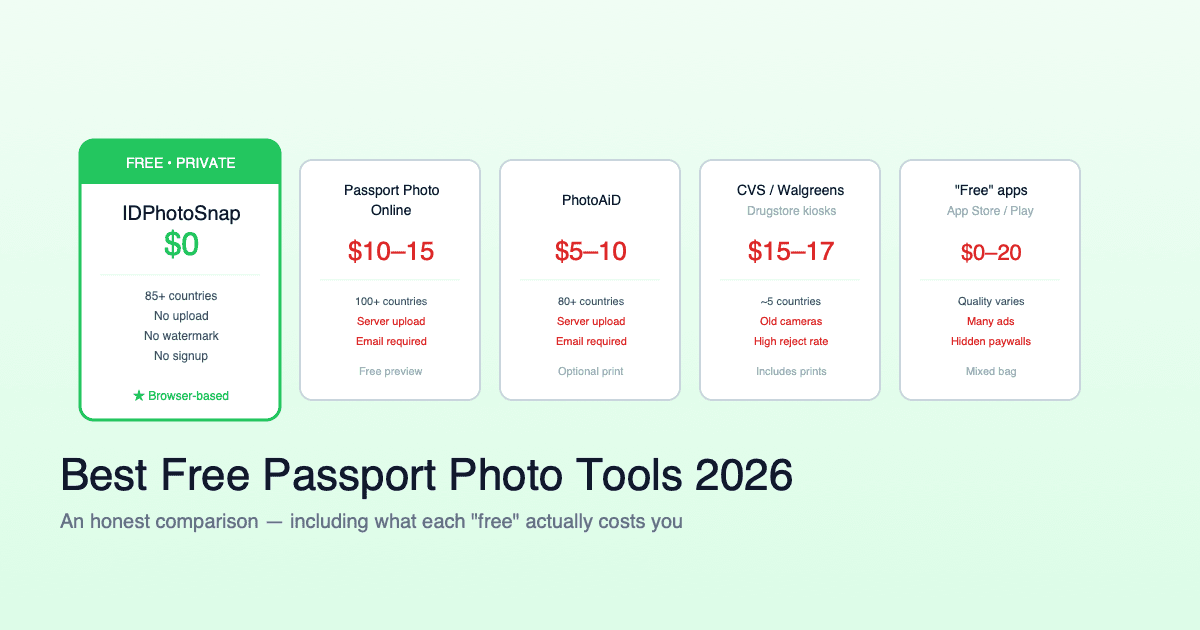
There is an awkward irony in 2026: half the tools that make passport photos are branded as "AI passport photo" makers, and the US has just banned AI from passport photos. Since 1 January 2026 the State Department rejects any passport or visa photo that was AI-generated, retouched to change your appearance, or given a digitally removed or replaced background, with no grace period and no appeal at the first review. So the obvious question: does using an "AI" tool now get your application thrown out? The honest answer is that it depends entirely on what the tool actually changes, not on the word in its name.
Disclosure: I built one of the tools compared below (IDPhotoSnap). I have tried to describe every tool, including mine, by what it actually does to the image. If you think a competitor is described unfairly, leave a comment and I will correct it.
What the 2026 ban actually prohibits
The rule is about changing how you or the scene look. Three things are now rejected:
- AI-generated photos - an image created or substantially synthesised by a generative model (Midjourney, DALL-E, Stable Diffusion and the like). This was never going to pass, but it is now explicit.
- Retouching that changes your appearance - skin smoothing, blemish removal, beauty filters, slimming or reshaping, and lighting correction. The photo has to look like you, lit as you actually were.
- Digitally removed or replaced backgrounds (US passport and visa) - the white background must be real, photographed against a white or off-white wall, not generated or swapped by software.
And here is the part most "AI tool" pages bury - what is still completely fine:
- Cropping to the required frame
- Resizing to the required pixel dimensions
- Rotating to straighten
- Converting the file format (HEIC to JPG, etc)
None of those four touch your face or the scene, so they are allowed for every country. The dividing line is simple: formatting is fine, appearance changes are not.
The real test is not "AI", it is "what does it change?"
"AI" in a passport photo tool usually means two harmless things and one risky one. The harmless parts are face detection (finding your head so it can size the crop) and automatic cropping. Those are just formatting, done for you. The risky parts are anything that rebuilds the background or improves how you look.
So when you compare tools, ignore the marketing word and ask two questions: does it change my appearance, and how does it produce the white background? That is the whole decision.
What each tool actually changes
| Tool | Changes your appearance? | Background method | Where it runs | Cost |
|---|---|---|---|---|
| IDPhotoSnap | No (crop + resize only) | Optional digital fill, can be skipped; warns US needs a real wall | Your browser, no upload | Free |
| PhotoAiD | No (crop + background) | AI removes/replaces background | Server, retained up to 90 days | $5-10 |
| Passport Photo Online | No (crop + background) | AI replaces background (+ paid upsell) | Server, retained up to 30 days | $10-15 |
| Generic app-store apps | Sometimes (beauty filters) | Varies, often AI replace | Varies | Free / paywalled |
Two things stand out. First, the reputable paid tools (PhotoAiD, Passport Photo Online) generally do not beautify your face - that part is fine. Their exposure is the background: their core feature is digital background replacement, which the US now rejects. Second, the category to actually fear is the cheap app-store apps that quietly apply a beauty filter, because that is the appearance change the rule is written to stop.
The honest part nobody likes: background
This applies to my tool too.Any software that removes or replaces the background digitally produces a US-non-compliant photo in 2026, including IDPhotoSnap's background fill. There is no clever workaround. For a US passport or visa photo, the only safe route is to photograph yourself against a real white or off-white wall and then use software for cropping and resizing only. The difference between tools here is not the technology, it is whether they tell you this. We put it in the tool as a warning and wrote a full explainer on the US background rule. A "100% acceptance guaranteed" badge does not.
For most other countries (UK, Schengen, India, Canada, Australia and many more), digital background editing is still accepted, so the background question goes away and the choice comes down to privacy and price.
Where letting software help is genuinely safe
Outside the US background rule, the two differences that survive are the same ones that mattered before the ban, just sharper now:
- Privacy. A passport photo is biometric data you cannot rotate like a password. Server-based tools upload and retain it (30 to 90 days in the cases above). A browser-only tool processes the image on your device and never uploads it. You can verify this yourself: open DevTools, watch the Network tab during use, and check whether your photo is sent anywhere.
- Cost. "AI passport photo" almost always means free preview, paid download ($5-15). A tool that runs on your device has no server cost, which is why it can stay genuinely free with no watermark.
This is where IDPhotoSnap lands by design: it does only the allowed formatting steps, runs entirely in your browser, and is free. It is not magic, it just refuses to do the parts that get photos rejected. For a deeper feature-by-feature view, see the full honest comparison of passport photo tools.
A 30-second safety checklist for 2026
- US photo? Real white wall, then crop and resize only. No digital background, no relighting, no filters.
- Any country? Make sure the tool is not beautifying you. If your skin looks smoother or your face slimmer than the original, do not use that output.
- Keep the original. If asked, you should be able to show an unedited capture that matches the submitted photo.
- Treat a guarantee as a refund, not a pass. It does not prevent the weeks of delay a rejection adds.
- Prefer tools that keep the photo on your device if you care about where your biometric data goes.
FAQ
Will using an AI passport photo tool get me rejected?
Only if it changes your appearance or fabricates the background. A tool that just crops and resizes is fine. The name does not matter, the edit does.
Is AI background removal allowed for a US photo?
No, not since 1 January 2026. Any digitally removed or replaced background is rejected, from any tool, including mine. Use a real wall for US photos. Most other countries still accept digital backgrounds.
What can software still legally do?
Crop, resize, rotate, and convert the file format. None of those change your appearance or the scene, so they are allowed everywhere.
Do the paid tools beautify my face?
The reputable ones generally do not - their risk is the digital background, not the face. The face-editing risk is highest with cheap app-store apps that auto-apply beauty filters. Check the output against your original.
The safe move in 2026 is a tool that does less, not more, and is honest about the rule. If you want one built that way, IDPhotoSnap is at idphotosnap.com - it crops and resizes, never edits your face, runs in your browser with no upload, and is free.
Related guides
Will an AI Background Tool Get Your US Passport Photo Rejected in 2026?
Since 1 January 2026 the US State Department rejects passport and visa photos with a digitally removed or replaced background. Here is what that means, why an honest tool tells you to use a real white wall, and exactly what you can still do digitally (crop and resize).
Why Was My Passport Photo Rejected? Top 10 Reasons (2026)
Most passport photo rejections come down to 10 specific issues. Each one is fixable in 2 minutes. Here's the full diagnostic checklist with examples.
Best Free Passport Photo Apps 2026 (Honest Comparison)
We compared major free and paid passport photo tools for 2026. Real prices, privacy practices, country coverage, and the catch with each.
US Passport Photo Requirements 2026 (Complete Guide)
Every official US passport photo requirement for 2026: size, background, head size, expression, and State Department specifications.
How to Take a Passport Photo at Home (Step-by-Step Guide)
Save $15 - 20 by taking your own passport photo at home. Here is exactly how to do it right - background, lighting, pose, and common mistakes to avoid.
About the Author
Elena Dev, Founder of IDPhotoSnap
Elena Dev is the sole operator of IDPhotoSnap. Her work involves auditing the official photo specifications of 100+ countries against issuing-authority sources (embassies, government portals, ICAO 9303) and translating those rules into a browser-only tool that runs entirely on the user's device. The full 276-format specification dataset is published as MIT open data on GitHub. Source verification methodology and corrections policy are documented on the editorial standards page. Every article is written and reviewed by Elena Dev. Corrections: elena@idphotosnap.com.
Found this useful? Public reviews are how new readers discover IDPhotoSnap. Leave a quick Trustpilot review →