Compare Passport Photo Tools 2026: 5 Claims to Verify
By Elena Dev, Founder · May 15, 2026 · 11 min read
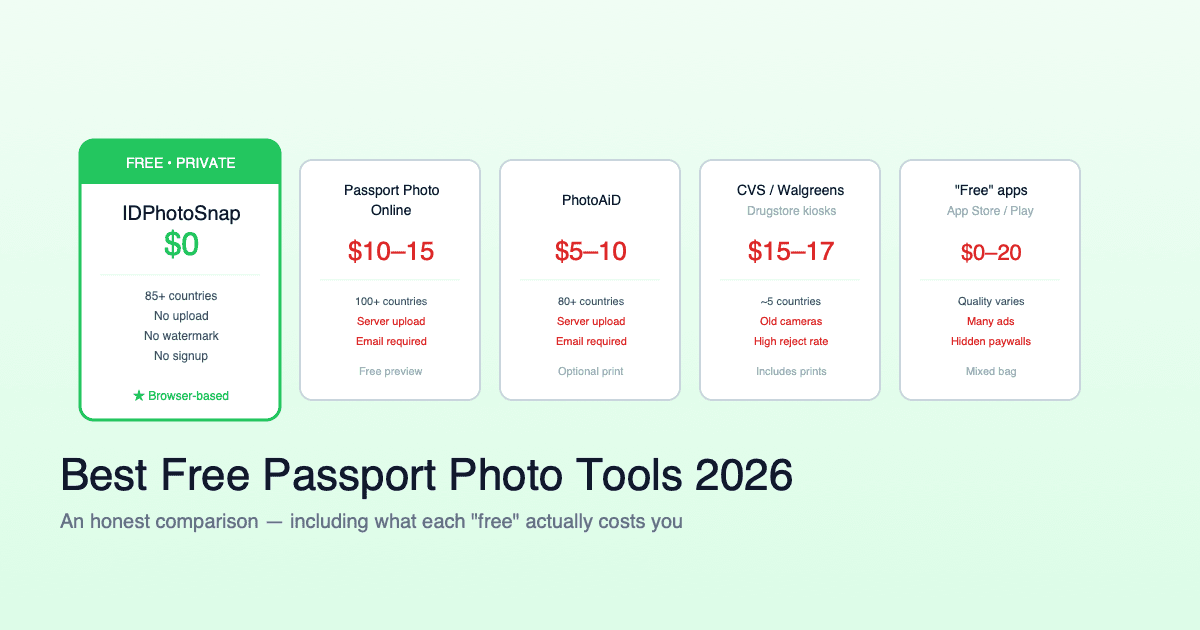
Passport photo tools market themselves with confident numbers: "99.3% acceptance rate", "200+ countries supported", "AI-compliant", "privacy-first". Most of these claims are unverifiable and several are simply marketing inflation that does not survive a 5-minute check. If you are choosing a tool for a real visa or passport application, here is how to read the five most common claims you will see, and what to verify before committing time to a tool that may not deliver.
The short version
- "99% first-submission acceptance" - rarely has documented methodology. Most tools cannot actually measure this.
- "200+ countries supported" - usually ICAO 9303 default fallback. Real differentiated specs are 30-40 countries.
- "Privacy-first" - covers everything from encrypted upload to browser-only. The strongest interpretation is verifiable in DevTools.
- "AI editing ban compliant" - marketing language unless the tool actually shows what processing it applies. Geometric cropping and background removal are fine; skin smoothing is not.
- "100% free" - five common gotchas: paid download, watermark, country paywall, subscription, signup gate.
- The 5-minute pre-flight test verifies all five claims with a placeholder photo before you commit time to your real photo session.
Claim 1: "99% first-submission acceptance rate"
The most quantitative-sounding claim and almost always the least verifiable.
To produce a real acceptance rate a tool would need to track every photo from its export through to the government portal outcome - the embassy, passport office, or visa center accepting or rejecting it. That requires the user to submit the photo to the government and then come back to the tool to report the result. No public passport photo tool publishes audited data showing how its acceptance rate was calculated. None has a feedback loop that captures the actual government decision.
What "99.3% acceptance rate" usually means in practice:
- An internal estimate the marketing team picked because it sounds credible (97-99% is the typical range)
- A pre-export quality check that flagged 99% of test photos as "passing" - an internal validator, not a real-world acceptance metric
- A user survey with selection bias (only people who got accepted bother to reply)
- A figure cited from third-party reviews that originally came from the tool's own marketing
How to verify: ask the tool how it measures acceptance and where the methodology is published. If neither is available, the figure is unverifiable. This does not mean the tool is bad - it means the specific claim cannot be taken at face value.
Claim 2: "200+ countries supported"
Country count claims range from 80 to 900+. They almost all use one of two definitions, and the more aggressive one inflates the number considerably.
Most photo specs converge on ICAO 9303 - the international standard for machine-readable travel documents. Of the world's 193 ICAO member states, only about 30-40 have materially distinct photo specifications:
- US: 51 x 51 mm square
- Schengen visa: 35 x 45 mm white background
- UK: 35 x 45 mm with light grey background allowed (one of few)
- China visa: 33 x 48 mm (unique tall format)
- Canada: 50 x 70 mm with name/date on back
- India: 51 x 51 mm passport, 35 x 45 mm driving license, 25 x 35 mm PAN card
- Japan: 35 x 45 mm, specific eye line
Beyond these, country specs largely converge. A tool that claims "200 countries" or "900 document types" usually counts every jurisdiction in a database, including those that simply fall back to the 35x45mm ICAO default. This is not wrong - if your country has no documented deviation, ICAO default is correct. But the number overstates how much country-specific work the tool has done.
How to verify: check the country page for the destination you actually need. Does the tool cite the official government source (US State Dept, UK HMPO, German Bundesdruckerei, Indian PSK, Chinese MFA COVA, etc.) or does it just show the same generic 35x45mm white-background spec for every smaller country? Genuine per-country validation comes with explicit source citations. If you want to verify even further, machine-readable open datasets exist - our passport-photo-specs repository is one example, listing 100+ countries with 276 document formats and explicit government source citations.
Claim 3: "Privacy-first"
The privacy posture spectrum is wider than the marketing language suggests. "Privacy-first" covers tools that:
- Upload your photo to a server unencrypted (rare but exists)
- Upload your photo to a server encrypted in transit, decrypt server-side for processing
- Upload your photo, process, then auto-delete after some hours
- Process the photo entirely in the browser - the photo never leaves your device
All four market as "privacy-first". Only option 4 removes the provider from the data-handling chain. For passport photos, which are biometric data under GDPR Article 9, Illinois BIPA, Texas CUBI, and India DPDP Act 2023, the difference between options 2 and 4 is the difference between "the provider has your face on their server briefly" and "the provider never had your face".
How to verify: open browser DevTools, switch to the Network tab, filter to Fetch/XHR, run the photo workflow. A browser-only tool shows zero photo uploads. Static asset requests (JavaScript, fonts, ML model weights) are expected; photo bytes in a POST or PUT request are not. This 90-second test cuts through every marketing claim. See our privacy-first explainer for the deeper version.
Claim 4: "Compliant with 2026 AI editing ban"
The US State Department issued updated guidance in early 2026 that passport photos with AI retouching - skin smoothing, beauty filters, facial reshaping - would not be accepted. The rule had been in effect informally for years; the 2026 update made enforcement explicit.
What the rule actually covers:
- Not allowed: skin smoothing, beauty filters, eye-brightening, jawline reshaping, teeth whitening, AI face generation
- Still allowed: geometric cropping, background removal/replacement (the photo of you is unaltered), JPEG compression, color correction at the photo-level, brightness adjustment
"AI compliant" as a marketing claim can mean the tool genuinely avoids retouching, or it can mean nothing - just a stamp added to the homepage after the policy update. Some tools that claim AI compliance still apply skin smoothing as a default "enhancement".
How to verify: compare a before/after preview from the tool. If skin texture changes, eye color brightens, or facial proportions shift, the tool is doing retouching. Background change alone is fine; face change is not. See the AI photo ban fact-check for what the State Department actually said.
Claim 5: "100% free"
The most-tested claim and the most varied in practice. Five common interpretations:
| Pattern | How to recognize | Hidden cost |
|---|---|---|
| Genuinely free | No price page, no signup, clean export | None (or ad-supported) |
| Free preview, paid download | Watermarked preview, paywall at export | $5-15 per photo |
| Watermark unlock fee | Visible logo overlay on export | $3-10 to remove |
| Country paywall | Some countries free, others paid | $2-10 per non-default country |
| Trial-to-subscription | 7-day "trial", auto-renews | $5-15/month |
| Email gate | Photo emailed instead of direct download | Newsletter signup obligation |
How to verify: run a test export with a placeholder photo. Open the result. Five checks: watermark visible at 100% zoom? Paywall at the download step? Country selection limited? Subscription auto-enrolled? Email required to receive the file? See our watermark deep-dive for the freemium pressure pattern.
The 5-minute pre-flight test
Run this on any tool before you commit time to your real passport photo session:
- Pick a placeholder photo. Any portrait you have - phone photo, video call screenshot, old passport selfie. Quality does not matter for this test.
- Open the tool, select your real destination country and document type. Do not pick "US" if your real need is China visa.
- Open browser DevTools, switch to Network tab, filter Fetch/XHR. Keep it open during the workflow.
- Run the full workflow: upload, crop, export.
- Check the Network tab. Photo bytes in a POST/PUT? Tool is not browser-only.
- Check the export. Open at 100% zoom. Watermark? Paywall reached? Subscription enrolled? Email required?
- Check the country page. Does it cite the official government source for your destination?
- Verify dimensions match. The export should be the exact size for your destination - 51x51mm for US, 35x45mm for Schengen, 33x48mm for China, etc.
Five to seven minutes total. Saves the much larger time investment of the actual photo session if the tool turns out to have issues.
What actually matters in 2026
In rough order of importance for a real visa or passport application:
- Correct spec for your specific destination. 35x45mm white background works for most Schengen visas but not for a Chinese visa (33x48mm) or a US passport (51x51mm). Match exactly.
- Government source citation. The tool should reference the issuing authority for the spec it claims. US State Department, UK HMPO, German Bundesdruckerei, Italian Polizia di Stato, Indian PSK + Sarathi, Chinese MFA, Schengen Annex 11 / ICAO 9303. A tool that just shows generic specs without citing sources cannot be verified.
- Verifiable privacy posture. Browser-only is the strongest, DevTools-verifiable. If you do not care about privacy, this matters less - but for biometric data the verifiable claim wins over the marketed claim.
- Genuine free vs hidden cost. Test the actual export. Watermark, paywall, subscription, country lockout, email gate - all happen at the moment you most want the photo to work.
- Output formats matching your submission portal. US DS-160 caps files at 240 KB. Indian Sarathi/Parivahan needs a 20-50 KB JPG. Chinese COVA requires JPG only, no PNG or HEIC. A tool that does not match these portal-specific output formats forces you into extra editing steps.
Country count claims (160, 200, 900) sit far below these five. They are not unimportant - if your country is unusual, you do need a tool that has heard of it. But a tool that claims 200 countries with no source citations is not better than a tool that claims 100+ countries with full citations.
Why tools market this way
Passport photo tools sit in a competitive category with low product-level differentiation. Most tools use a similar tech stack: face detection (MediaPipe Face Detection or commercial equivalent), background segmentation (BRIA RMBG-1.4 or similar), Canvas-based cropping. The actual outputs converge.
Marketing fills the differentiation gap. Bigger country count claims, higher acceptance rates, "AI" branding, "compliance" stamps. The buyer-side problem is that passport photos are bought once every 5-10 years per person, so user research is shallow. Most buyers default to the most confident-sounding claim.
This is not unique to passport photos. The same dynamic appears in PDF compressor tools, file converters, screen recorder apps. Recognize the pattern, test before committing, and the actual product differences become visible.
FAQ
What does "99% first-submission acceptance rate" mean?
It is a marketing figure rarely backed by documented methodology. Real acceptance rates require tracking each photo from export through to the government portal outcome - no public passport photo tool publishes audited data on this.
How are "200+ countries" counted?
Usually by including every ICAO member state, with most beyond the top 30-40 falling back to the 35x45mm ICAO default spec. Real per-country validation is rarer than the count suggests.
Is "privacy-first" the same as "encrypted upload"?
No. Encrypted upload sends your photo to a server (decrypted there). Browser-only processing never sends it at all. Only browser-only removes the provider from the data-handling chain.
What does "AI editing ban compliant" mean?
The US State Department 2026 guidance prohibits skin smoothing, beauty filters, facial reshaping. Geometric cropping and background removal remain allowed. "Compliant" can mean genuinely so or just marketing language without behavioral change.
What does "100% free" mean in practice?
Five common patterns: genuinely free, free preview/paid download ($5-15), watermark unlock fee, country paywall, trial-to-subscription. Verify by test export.
How can I verify all 5 claims?
5-minute pre-flight test: placeholder photo, DevTools Network tab open, run full workflow. Check upload bytes, watermark on export, paywall, subscription, country source citation. All verifiable in your browser.
What actually matters when choosing a passport photo tool?
Correct spec for your destination, government source citation, verifiable privacy, genuine free posture, portal-matching output formats. Country count claims rank lower than all five.
Why is there so much marketing inflation in this category?
Low product-level differentiation (most tools use the same tech stack) plus shallow buyer research (passport photos bought every 5-10 years) plus once-per-decade buying decision. Marketing fills the gap; buyers default to the most confident-sounding claim.
Looking for a tool to actually use? IDPhotoSnap is browser-only (verifiable in DevTools), 100+ countries with 276 document formats validated against 15+ official government sources, MIT-licensed open dataset published at github.com/BlondDev-Art/passport-photo-specs. Free, no signup, no watermark.
Related guides
Privacy-First Passport Photo: Browser-Only vs Server (2026)
Three privacy-first architectures: server unencrypted, encrypted, browser-only. Only browser-only removes the provider from the chain.
Why Free Passport Photo Apps Add Watermarks (2026 Test)
Why every 'free' passport photo app delivers a watermarked file, and why removing it in Photoshop still gets you rejected. 3-min test.
Are AI Passport Photos Banned in 2026? (Fact-Check)
Content farms claim a new AI passport photo ban in 2026. Fact-check: no new rule. What State Dept actually prohibits and allows.
Best Free Passport Photo Apps 2026 (Honest Comparison)
We compared major free and paid passport photo tools for 2026. Real prices, privacy practices, country coverage, and the catch with each.
China Visa Photo 2026 (33x48mm, COVA + Consulate Compliant)
33x48 mm Chinese visa photo, COVA-ready and consulate-compliant. White background, ICAO biometric specs, JPG + printable PDF. Free.
About the Author
Elena Dev, Founder of IDPhotoSnap
Elena Dev is the sole operator of IDPhotoSnap. Her work involves auditing the official photo specifications of 100+ countries against issuing-authority sources (embassies, government portals, ICAO 9303) and translating those rules into a browser-only tool that runs entirely on the user's device. The full 276-format specification dataset is published as MIT open data on GitHub. Source verification methodology and corrections policy are documented on the editorial standards page. Every article is written and reviewed by Elena Dev. Corrections: elena@idphotosnap.com.
Found this useful? Public reviews are how new readers discover IDPhotoSnap. Leave a quick Trustpilot review →